Fix line three. Line twelve updates.
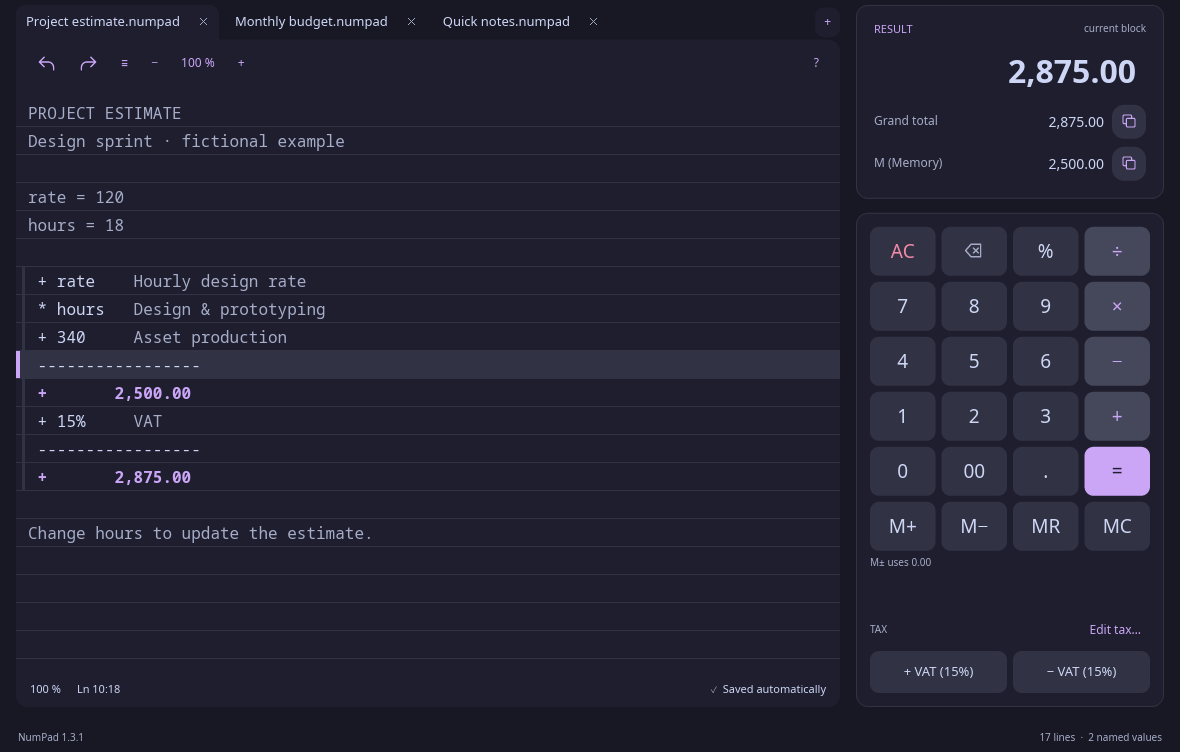
Every line is one step on the running total. Change any earlier amount and everything below it recalculates. Nothing to retype.
120 × 182,160
Calculator apps copy a 1970s gadget.
NumPad uses the screen you actually have.
It is a running tape: amounts down a column, a note beside each one, and totals that update when you change any line. Too big for a calculator, too small for a spreadsheet? This is the tool in between.
Linux · macOS · Windows
Edit any line above. Everything below it follows.
WHY A TAPE
Every line is one step on the running total. Change any earlier amount and everything below it recalculates. Nothing to retype.
Set a rate or a quantity at the top, then write it by name. Raise the rate in one place and every line that uses it follows.
The quote, the budget, and the quick what-if, side by side. Each tab keeps its own tape, memory, and undo history, and reopens exactly where you left it.
Add VAT, or strip VAT that is already included, by dividing rather than subtracting. Set the rate once.
PDF for the client, Excel for the accountant, plain text for anyone. Or keep the .numpad file and reopen it later.
Type an invoice in exactly as it reads. If your total differs from theirs, the tape shows you which line.
THE WHOLE JOB ON ONE SCREEN
Named values, notes, subtotals, memory, and tax, with no formula bar in sight.
INSTALL IN SECONDS
A 6 MB download that runs in about 40 MB of memory. Native code, no bundled browser, no account. Your tapes live on your own disk, and NumPad never touches the network.
Browse all release filesDownloads the latest release and verifies its checksum.
curl -fsSL https://raw.githubusercontent.com/tsubaie/numpad/main/install.sh | shLinux x86_64 · Debian, Ubuntu, Fedora, Arch & more.
Requires glibc 2.35 or newer.
Download the Windows x64 ZIP from the latest release. Extract it, then open NumPad.exe.
Windows x86_64. Binaries are not publisher-signed; Windows may ask you to approve opening the app.
A calculator app is a pocket calculator drawn in pixels: one line of display, and the question is gone the moment you press =. NumPad keeps every step on a tape you can read, annotate, and edit. Get a line wrong and you fix that line; you never start over.
No grid, no cell references, no formulas to set up before you can start. You write numbers down a column the way you would on paper, and the totals are simply there. When a job outgrows a tape, export it to Excel and carry on.
Notepad calculators evaluate each line as a formula. NumPad runs like an adding machine: each line is one step on the running total, so a quote reads like a receipt, with a note beside every amount. It is also free, open source, and native on Linux and Windows as well as macOS.
NumPad is written in Rust with the Iced toolkit and ships as a single native binary. There is no bundled browser, which is why the download is about 6 MB instead of a hundred, and why it runs in roughly 40 MB of memory.
Yes. NumPad is free and open source under the MIT license. Use it, read the source, change it, or contribute on GitHub.
Operations run from top to bottom, like a running calculator: 10 + 2 × 3 gives 36, because each line applies to the running total. Assignment expressions use standard precedence, so answer = 10 + 2 × 3 gives 16. Press Enter to insert a subtotal; use a blank line for an independent calculation.
Your work stays on your computer. NumPad does not send calculations over the network. Sessions recover automatically, and you can explicitly save portable .numpad documents wherever you like.
Yes. Export a tape to plain text, PDF, or Excel, or share the original .numpad document. Excel exports contain values rather than executable formulas.
Linux x86_64 with glibc 2.35+, macOS 11+ on Intel and Apple Silicon, and Windows x86_64. macOS apps are ad-hoc signed, not Apple-notarized. Windows binaries and Linux packages are not publisher-signed. See the installation guide for details.